In the first post I gave some background on APEXLang and what you’ll need to get started. Before getting into the actual setup, I think it’s worth taking a step back and looking at how all the pieces connect. Knowing what each component is doing makes the setup steps a lot easier to follow, and it also helps when something doesn’t work the way you’d expect.
The Big Picture
There are two separate paths to keep in mind. The development path goes from VS Code through SQLcl directly to the database, and that’s how APEXLang files get exported and imported. The web runtime path is different: ORDS sits between the database and the browser, serving the APEX Builder and your deployed applications to users.
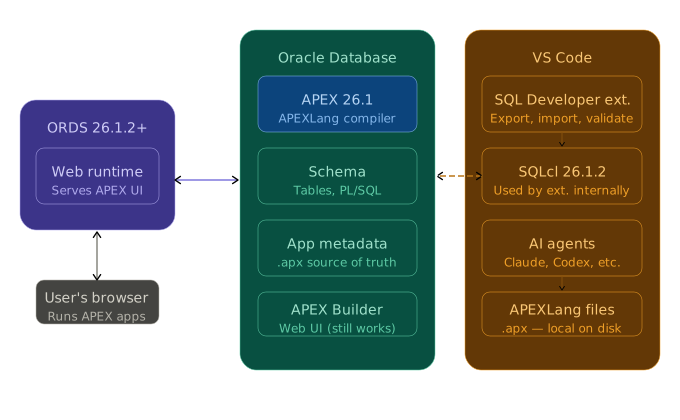
When you export your app to files, the request goes from VS Code through SQLcl directly to the database, and the APEXLang files land on your workstation. When you push changes back, the same path runs in reverse.
The Database and APEX
Your APEX application lives in the database. Every page, region, item, process, and dynamic action is stored as APEX metadata. APEXLang doesn’t move any of that, it gives you a way to read and write that metadata as files you can work with locally.
The database version matters. APEX 26.1 runs on Oracle Database 19c with a recent enough Database Release Update, and APEXLang works on 19c without any issues. Where 26ai makes a difference is at the AI layer. With Oracle AI Database 26ai, schemas can carry annotations, constraints, comments, and domains that give them semantic meaning. AI agents can use that context to work with your data model more accurately, without you having to explain it. If you’re on 19c, you can follow along with everything in this series. If you have access to 26ai, some of the AI-assisted workflows will feel noticeably sharper.
ORDS
ORDS (Oracle REST Data Services) is the layer between the database and the browser. It serves the APEX Builder and your deployed applications to users, that’s its job in this architecture.
ORDS is not in the path between VS Code and the database. SQLcl connects directly. So ORDS doesn’t need to be running for your file operations to work, but it does need to be running for you to use the APEX Builder and test your app in a browser. APEX 26.1 requires ORDS 26.1.1 or later.
SQLcl
SQLcl is Oracle’s command-line tool for interacting with the database. It handles SQL and PL/SQL, database object management, and since a few versions back, APEXLang file operations, exporting an app to files, importing files back, and a few operations in between.
The key thing here: the SQL Developer extension for VS Code calls SQLcl under the hood. You don’t run SQLcl commands directly most of the time. The extension is the interface; SQLcl is the engine. That’s why SQLcl 26.1.2 is a specific prerequisite, not just “any recent version.” Older versions won’t work correctly with the extension.
VS Code and the SQL Developer Extension
VS Code is where you do your development work. The SQL Developer extension adds database connectivity and APEXLang file operations directly into the editor. You can browse your schema, run SQL, export your app to a local folder, edit the files, and push the changes back, all from VS Code.
What makes this relevant to AI development: VS Code is also where tools like Claude Code and OpenAI Codex run. They work with files in your workspace. Once your APEX application is on disk as APEXLang files, those tools can read the structure, understand what’s there, and help you build and modify things. That connection is what the rest of this series is about.
VS Code isn’t the only way to export and import APEXLang files, though. You can do both directly from the APEX web interface as well, without any local tooling. The files are the same either way, it’s just a different entry point.
Note:
As of now, APEXLang import is a full application import only. You can’t push a single page or component in isolation, the entire application gets replaced on import. The dev team is working on more granular import support, but that’s not available yet. When multiple developpers are working on the same application at the same time, it’s recommended to use working copies to
MCPs
MCP stands for Model Context Protocol. It’s an open standard that lets AI assistants connect to external tools and data sources at runtime, not just from their training data.
Without MCPs, an AI assistant knows what’s in its training data and what you’ve opened in your editor. With MCPs, you can wire it up to live systems. In this context, that means giving the AI a direct connection to your Oracle database. It can query your schema, look up table structures, check what packages and procedures exist, and work from real information rather than assumptions.
MCP servers for Oracle Database already exist. Locally, SQLcl ships one built-in and it integrates directly into the SQL Developer VS Code extension. If you’re running on OCI, Oracle also offers a managed MCP connector service. Either way, instead of describing your data model to the AI and correcting it when it gets things wrong, you let it look up what it needs on its own. The answers get a lot more accurate.
MCPs are not required to get started with APEXLang. You can do a lot with just files and an AI assistant that knows the APEXLang format. But understanding what MCPs add early makes the full setup feel less like overhead and more like a natural part of the workflow.
MCPs are essentially a controlled channel that lets your preferred AI agent talk directly to the database, reading real schema, running real queries, and getting real answers instead of assuming or having you provide the information.
Useful References
Introducing MCP Server for Oracle Database — Oracle Database Insider, July 2025
Gain Agentic Access to Any Oracle Database in the Cloud with Native, Enterprise-grade Managed MCP Servers in OCI — Oracle Database Insider, May 2026
The next post gets into the actual workspace setup, once you know what each piece is for.
Next up, getting everything installed and configured.